Freelancer bookkeeping: invoices, mileage and a tax set-aside in one file
A freelancer's books come down to three questions: who owes me, what did I earn after costs, and how much should I put aside for tax. Ledgerfern answers all three from one ledger.
How professional services teams use Ledgerfern
- Set your payment terms on Settings (for example 14 or 30 days) so every invoice gets a due date.
- Add each invoice on the Invoices tab; status turns Open, Overdue or Paid and shows days late.
- Log client trips on Mileage with odometer readings; the deduction is worked out at your rate.
- Record income and expenses on the Ledger; check the Taxes tab each quarter for the set-aside.
In the example file's first quarter, income of $5,162 minus $1,054 of expenses and mileage left $4,108 net profit, with $1,027 (25%) set aside.
The business licence covers your own business on any of its devices.
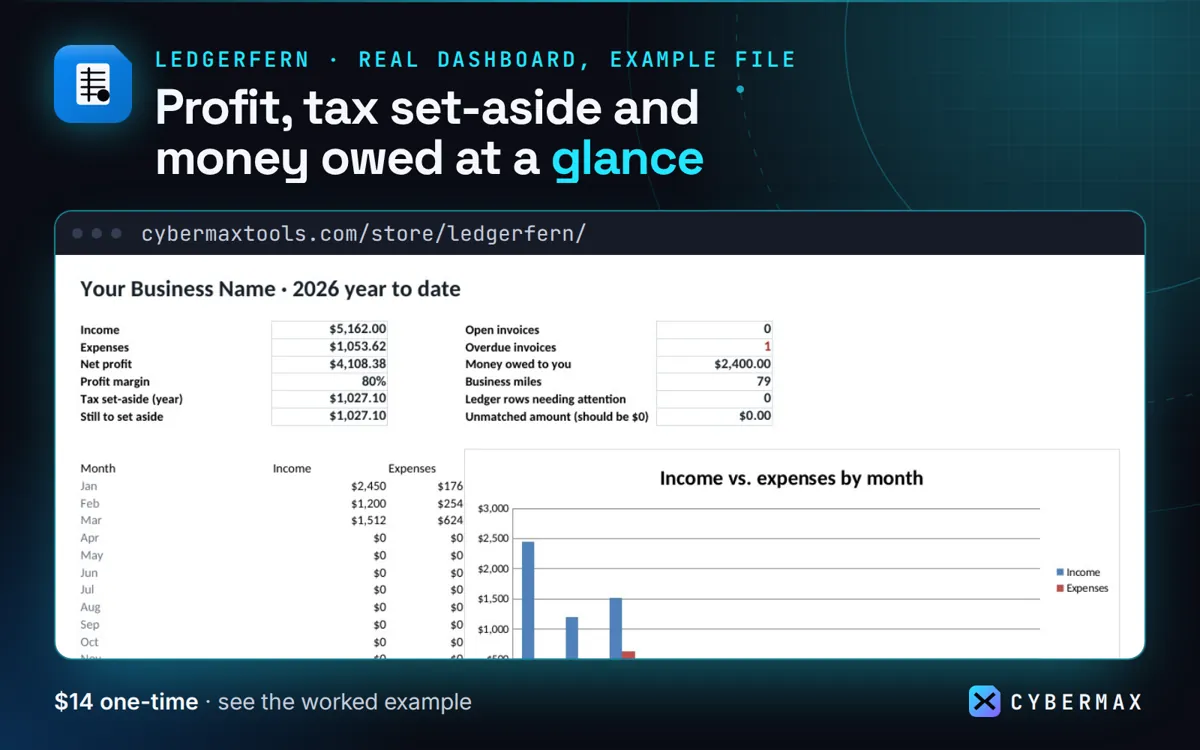
Example file, first quarter (Jan-Mar 2026): P&L summary
| Line | Q1 | Year to date |
|---|---|---|
| Income | $5,162 | $5,162 |
| Expenses + mileage | $1,054 | $1,054 |
| Net profit | $4,108 | $4,108 |
| Set aside (25%) | $1,027 | $1,027 |
Source: The made-up example business in the Ledgerfern example file, P&L and Taxes tabs (built by products/ledgerfern/src/workbook.py; rows in products/ledgerfern/store/listing.json).
FAQ
Does it send invoices?
No. It tracks invoices you send from your own template or tool, with due dates and overdue status.
Why not accounting software?
For a one-person business, a file you own with no monthly fee is often enough. If you need bank feeds or payroll, use accounting software.
Ledgerfern: full guide with prices and alternatives · All use cases · Store