Turn a podcast or long video into captioned vertical shorts
Drop a video file or paste a direct media, Google Drive, Dropbox, podcast RSS or Apple Podcasts link. Clipwhit transcribes it with Whisper inside your browser, scores the moments most likely to work as shorts, crops to 9:16 following the biggest face, and burns in word-by-word animated captions. Each clip comes with a title, description and hashtags, as MP4 + SRT + TXT or one ZIP. Audio-only episodes become audiograms with the show artwork and a waveform.
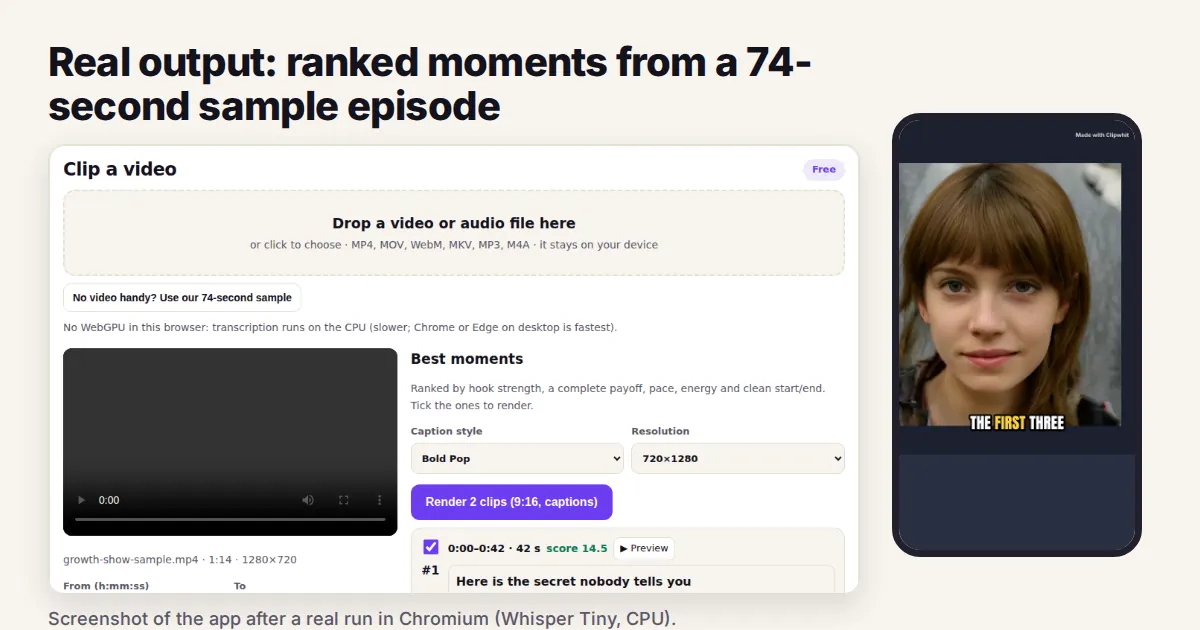
Measured run in a headless browser on a 4-vCPU machine, CPU only, Whisper Tiny.en
| Test | Result |
|---|---|
| 74 s sample episode | transcript + 2 moments in 48 s, including the first model download |
| Rendering (free, 720x1280) | 2 clips of 32.5 s and 24.3 s in 63 s; face found in every checked frame |
| Output | H.264 + AAC MP4s, SRT and TXT, ZIP of 6 files |
| 60-minute file (Pro) | transcription 23.4 min; 5 clips of 35-40 s rendered in 159 s total |
| Pro 1080x1920, Karaoke captions, no mark | 2 clips in 126 s |
Source: Clipwhit test results, 29 Sep 2026 (products/clipwhit/README.md, tests/e2e.mjs). The 74 s sample is synthetic speech with a generated face.
Clipwhit vs the alternatives
Published prices, each checked on the date shown; prices change, so confirm on each site.
| Product | Price | Free | Checked |
|---|---|---|---|
| Clipwhit Pro | $12/month; $120/year; $199 lifetime; Agency $49/month | 3 clips per video, 720p, small corner mark | live |
| Opus Clip | Starter $15/month; Pro $29/month; Business custom | free plan with watermark, 3-day storage | 2026-10-10 |
| Klap | Basic $14/month billed yearly (100 clips/month); Pro $39/month billed yearly (300 clips); Pro+ $94/month billed yearly (1,000 clips) | no free trial stated on the page | 2026-10-10 |
| OpenShorts Cloud | from $12/month for 100 minutes, no watermark, up to $59/month; self-hosted version free | first video up to 60 min, then 20 min/month, with watermark | 2026-10-10 |
Why teams pick Clipwhit
- No minute or clip caps on Pro: the work runs on your own computer, so there are no upload or credit limits to buy.
- Your video is never uploaded: it is read in the browser tab and stays on your device.
- Entry price at the bottom of the band: $12/month vs Opus Clip Starter $15 and Klap Basic $14 billed yearly.
- Captions, face-tracked 9:16 crop, titles, hashtags and SRT in one step; cancel any time from the billing portal.
How it works
- Open Clipwhit and drop a video or paste a supported link.
- Wait for the transcript and the suggested moments; keep the ones you like.
- Pick a caption style and download each clip (MP4 + SRT) or the whole ZIP.
FAQ
Is there a free Opus Clip alternative?
Yes: Clipwhit gives 3 clips per video free at 720p with a small corner mark, no sign-up. Pro is $12/month for unlimited clips at 1080x1920 with no mark.
Why not Opus Clip?
Opus Clip runs on its servers, is quicker on long episodes and has more editing features; paid plans start at $15/month. Clipwhit keeps your video on your device and has no minute caps on Pro.
Why not Klap or OpenShorts?
Klap counts clips per month and OpenShorts counts minutes; Clipwhit Pro has neither cap because your own computer does the work.
Can I paste a YouTube or TikTok link?
No. Those platforms forbid third-party downloads, so download your own original (for example from YouTube Studio) and drop the file in.
Limits?
On a CPU-only computer plan about 25 minutes of processing per hour of audio (WebGPU speed is not measured yet). Rendering uses browser memory, so very long clips or 1080p on phones are not recommended.