Planning your own wedding: one file for budget, guests and vendors
Without a planner, the hard part is keeping lists in sync: who is coming, what they eat, where they sit and what you still owe. Wedwren keeps one guest list and one vendor list and builds everything else from them.
How weddings & events teams use Wedwren
- Twelve months out: set the date and budget; the checklist schedules 26 tasks back from the date.
- As you book: add each vendor with total, deposit and balance due date.
- When invitations go out: add every invitation with the number of people; record RSVPs and meals as replies arrive.
- Final month: assign tables, fix any over-capacity warnings and send the caterer the meal counts from the Dashboard.
The example wedding shows the result on one screen: 96 of 145 coming, 35 chicken, 38 fish, 5 vegetarian, 4 vegan and 14 kids meals, $24,650 booked of a $30,000 budget and $16,450 still to pay.
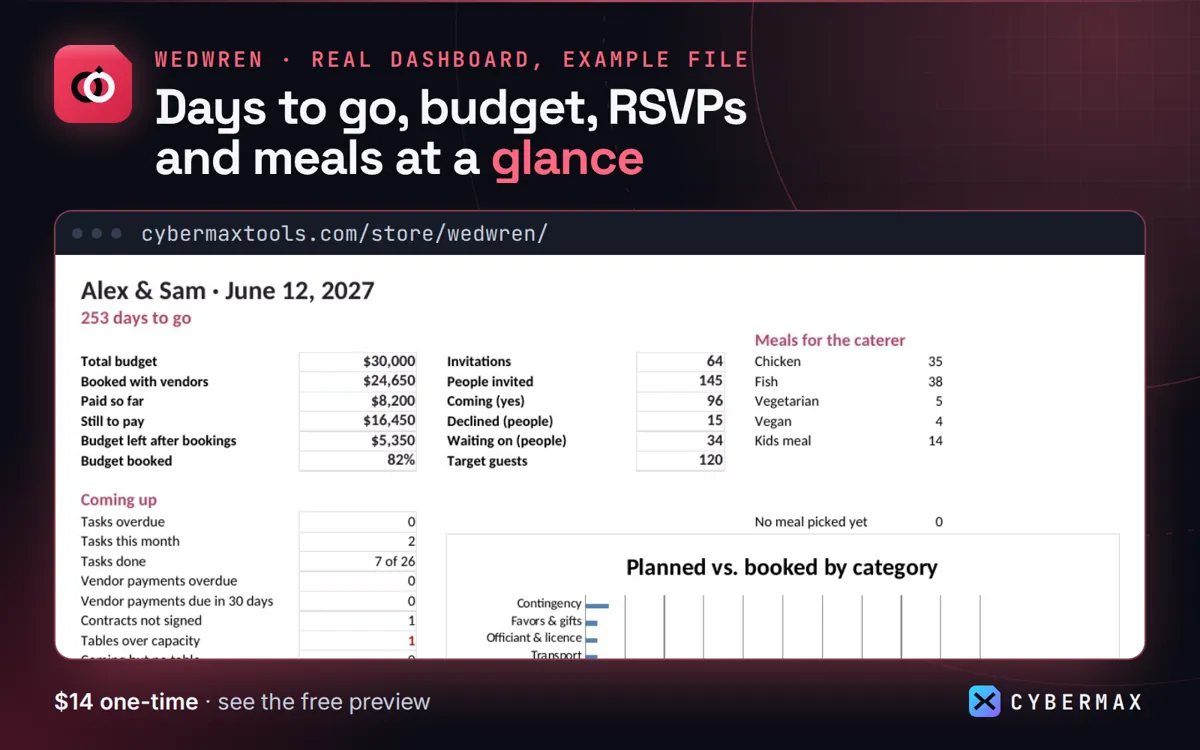
Example file: 64 made-up invitations, 5 vendors
| What | Example file |
|---|---|
| People invited / coming | 145 / 96 |
| Meals for the caterer | 35 chicken, 38 fish, 5 vegetarian, 4 vegan, 14 kids meal |
| Budget booked | $24,650 of $30,000 (82%) |
| Paid so far / still to pay | $8,200 / $16,450 |
| Tasks done | 7 of 26 |
Source: The made-up example wedding in the Wedwren example file, Dashboard (built by products/wedwren/src/workbook.py; rows in products/wedwren/store/listing.json).
FAQ
How many guests does it handle?
400 invitation rows (each can be a couple or family) and 40 tables.
Why not separate apps for guests and budget?
Separate apps don't share numbers; here meal counts and payments come straight from the lists.
Wedwren: full guide with prices and alternatives · All use cases · Store