Run your household budget month by month, with savings goals built in
A household budget fails when irregular costs surprise you. Centwren pairs the monthly budget with sinking funds for those costs (car insurance, holidays, repairs) and a bills tracker with due dates, so each month shows what is left and what is coming.
How consumer finance teams use Centwren
- List your categories and monthly amounts on Setup, grouped as needs, wants and savings & debt.
- Add each irregular cost as a sinking fund with a target and date; Centwren shows the monthly amount needed.
- Enter recurring bills with due dates; mark them paid or autopay.
- Log transactions weekly and check the Dashboard's over-budget list once a month.
The example household's September shows the idea: income $4,540, needs and wants under budget, savings & debt $100 short, all visible on one tab.
Personal licence: your own household, on any of your devices; share it with your partner in Google Sheets.
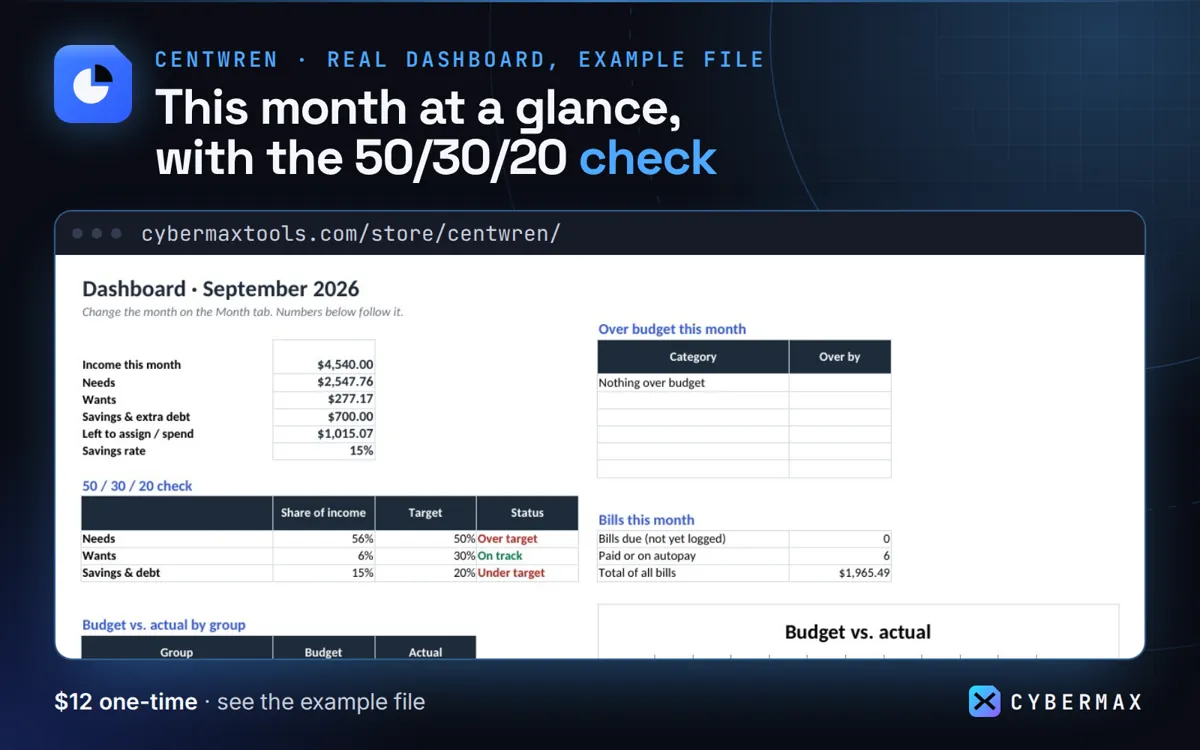
Example file, September 2026: budget vs actual by group
| Group | Budget | Actual | Status |
|---|---|---|---|
| Income | $4,500 | $4,540 | +$40 |
| Needs | $2,765 | $2,548 | under |
| Wants | $635 | $277 | under |
| Savings & debt | $800 | $700 | $100 short |
Source: The made-up example household in the Centwren example file, September tab (built by products/centwren/src/workbook.py; rows in products/centwren/store/listing.json).
FAQ
Can two people use it?
Yes: put it in Google Sheets and share it within your household.
Why not a budgeting app?
Apps charge monthly or yearly and usually want your bank login; Centwren is a one-time $12 file you own.
Centwren: full guide with prices and alternatives · All use cases · Store