Know if an LLM fits your GPU before you download it
Paste a Hugging Face model id or URL and pick a GPU, a Mac or a custom machine. Vramwise reads the model's parameter counts and config.json live from the Hugging Face API and shows, for every quantization from BF16 down to 4-bit and below, the weights, the KV cache, the total memory, whether it fits, the longest context that fits and an estimated tokens-per-second range. It handles mixture-of-experts models, sliding-window layers and DeepSeek's MLA cache, and knows Apple silicon memory limits per chip.
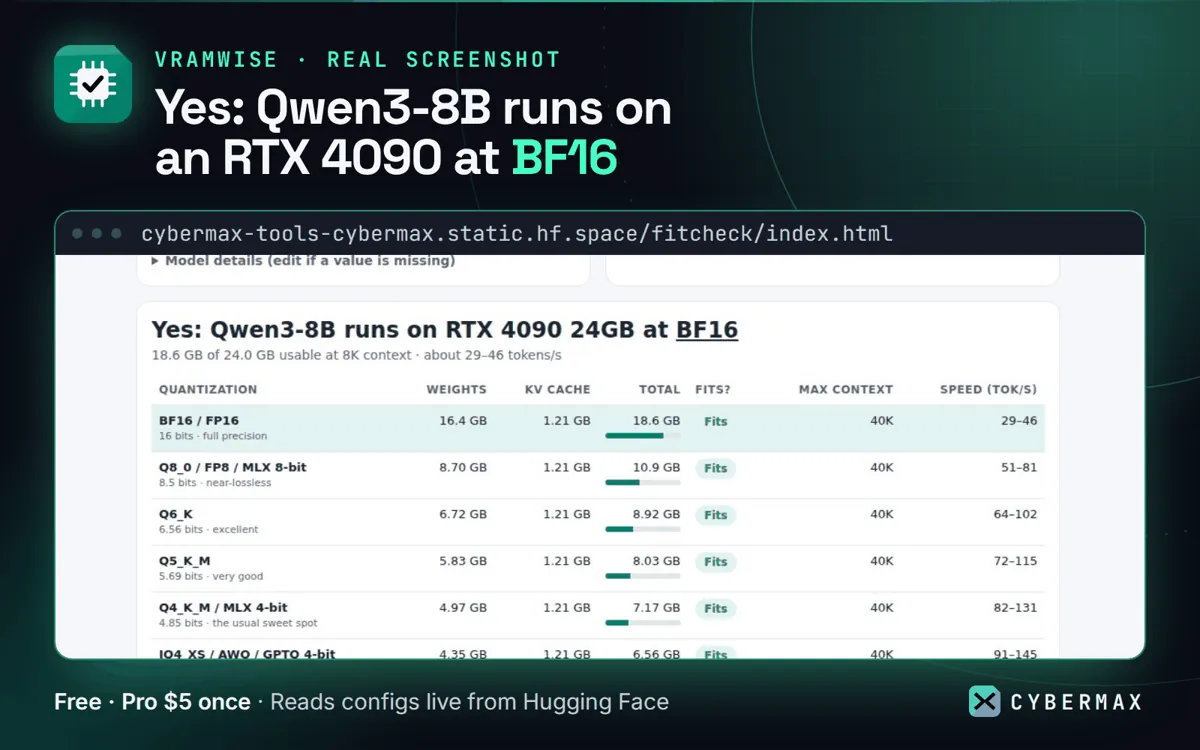
Qwen3-8B on an RTX 4090 24GB at 8K context: 18.6 GB of 24.0 GB usable at BF16
| Quantization | Weights | KV cache | Total | Fits? | Max context | Speed (tok/s) |
|---|---|---|---|---|---|---|
| BF16 / FP16 (16 bits) | 16.4 GB | 1.21 GB | 18.6 GB | Fits | 40K | 29–46 |
| Q8_0 / FP8 / MLX 8-bit (8.5 bits) | 8.70 GB | 1.21 GB | 10.9 GB | Fits | 40K | 51–81 |
| Q6_K (6.56 bits) | 6.72 GB | 1.21 GB | 8.92 GB | Fits | 40K | 64–102 |
| Q5_K_M (5.69 bits) | 5.83 GB | 1.21 GB | 8.03 GB | Fits | 40K | 72–115 |
| Q4_K_M / MLX 4-bit (4.85 bits) | 4.97 GB | 1.21 GB | 7.17 GB | Fits | 40K | 82–131 |
| IQ4_XS / AWQ / GPTQ 4-bit | 4.35 GB | 1.21 GB | 6.56 GB | Fits | 40K | 91–145 |
Source: Rows transcribed from the published Vramwise screenshot https://cybermaxtools.com/store/img/vramwise-1.webp (live app, Qwen3-8B on RTX 4090 24GB). Estimates, not measurements.
Vramwise vs the alternatives
Published prices, each checked on the date shown; prices change, so confirm on each site.
| Product | Price | Free | Checked |
|---|---|---|---|
| Vramwise | free; Pro $5 once (Markdown tables) | full fit check, share links and CSV | live |
| ApX Machine Learning VRAM & Performance Calculator | Basic $0/month (single-node VRAM breakdown); Pro $19/month; Pro+ $59/month (multi-GPU topologies) | Basic plan, free forever | 2026-10-10 |
Why teams pick Vramwise
- Reads the real model config live from Hugging Face, so new models work the day they are published.
- Every quantization in one table, including the published format (FP8, MXFP4) and llama.cpp mixes such as Q4_K_M.
- KV cache done properly for grouped-query attention, sliding-window layers and DeepSeek MLA, with FP16, Q8 or Q4 cache types.
- MoE-aware speed: active parameters come from the expert config (Qwen3-30B-A3B uses 3.3B active).
- Apple silicon: memory bandwidth per chip and macOS's default GPU memory limit, with a raised-limit switch.
How it works
- Open Vramwise and paste a Hugging Face model id (for example Qwen/Qwen3-8B) or URL.
- Pick your GPU, Mac or a custom machine, and the context length you need.
- Read the table: the best quantization that fits, its longest context and the speed range; share the link or export CSV.
FAQ
How much VRAM do I need to run an LLM?
Roughly the weights (parameters times bits per weight) plus the KV cache for your context plus about 1 GB of overhead. Vramwise does this per quantization from the model's real config; Qwen3-8B needs 18.6 GB at BF16 and 7.17 GB at Q4_K_M with 8K context.
Why not ApX's VRAM calculator?
ApX's free Basic plan gives a single-node VRAM breakdown and charges $19/month for Pro sizing. Vramwise is free for any model on Hugging Face, adds Apple silicon limits and MoE-aware speed, and its only paid extra is $5 once for Markdown tables.
How accurate is the speed?
It is an estimate: 50 to 80% of the memory-bandwidth ceiling for one user. Real speed depends on the runtime, drivers and batch size.
Does it work with gated models like Llama or Gemma?
Yes; the architecture is read from a public mirror. For GGUF repos, parameters come from the GGUF metadata.